Toffu API
Access Toffu's marketing tools directly through our REST API. Use it with Python, JavaScript, or any language that supports HTTP requests.
What is the Toffu API?
The Toffu API lets you programmatically interact with Toffu's capabilities. Send messages and integrate Toffu into your custom workflows and applications.
Working inside an AI client instead of your own code? Use the Toffu MCP server to connect Toffu to Claude, Cursor, or ChatGPT — same account, no code.
The key below is generated by a person in the dashboard. If the caller is an autonomous agent that has no one to click that button, see Toffu for AI Agents: it signs itself up and gets a working key back in a single request, no email and no OAuth consent screen.
Available Endpoints
POST /send_message - Send a message to Toffu and get a response, just like in the Toffu chat.
Setup
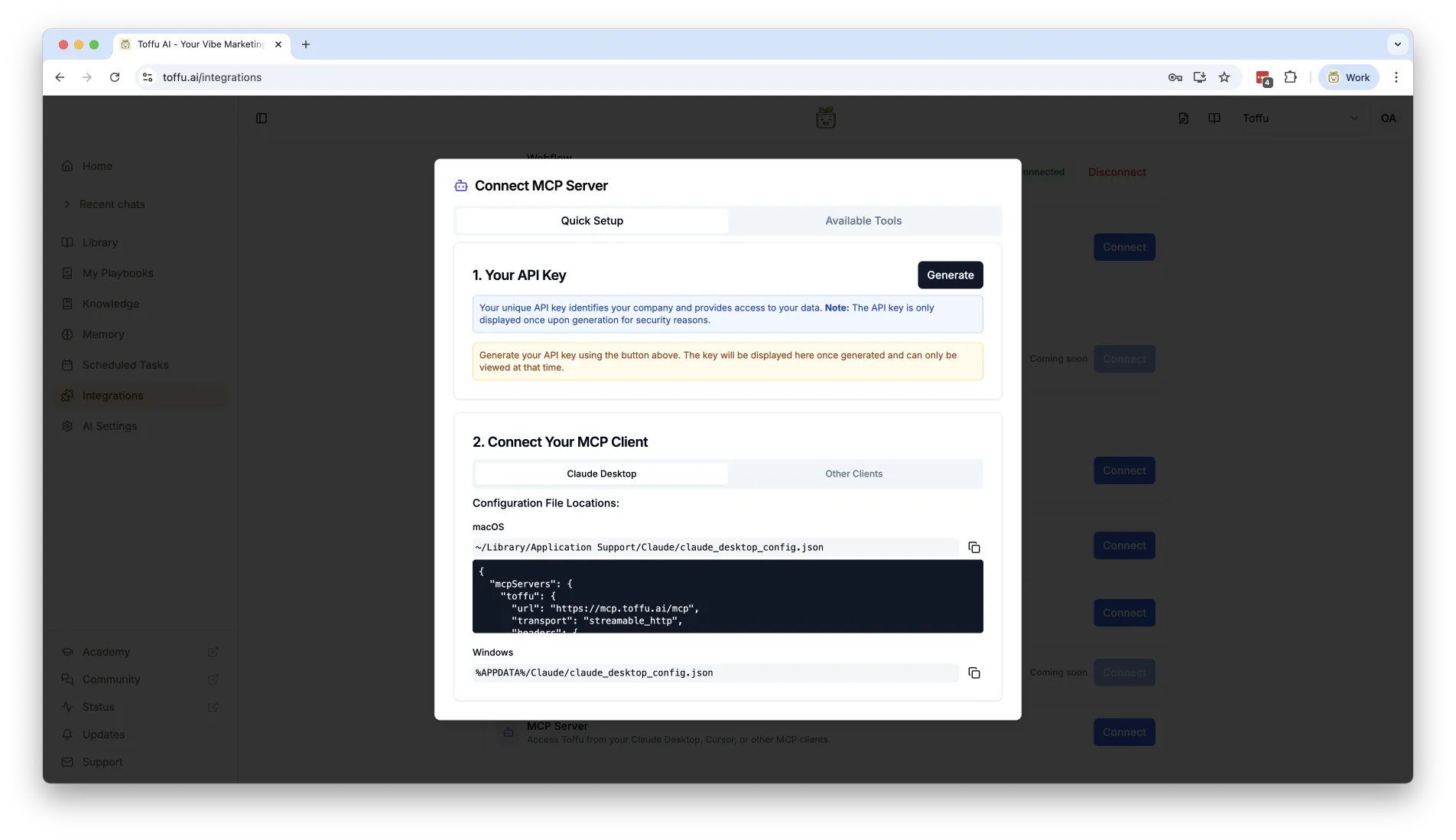
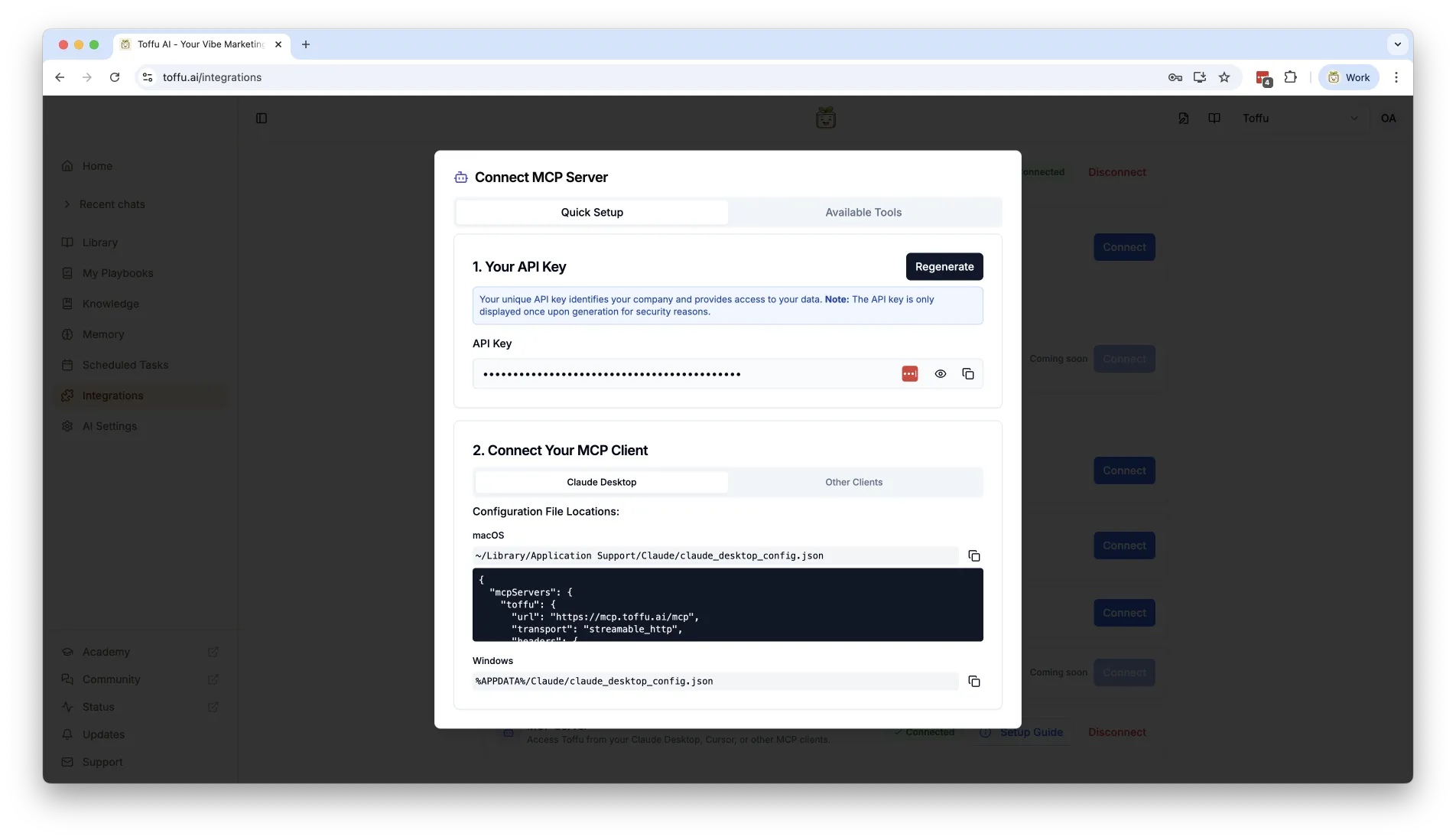
1. Generate API Key
Go to Integrations → MCP in Toffu dashboard → Generate API Key
Make sure to copy the API key when you generate it, it will not be shown again. If you lose it, you can generate a new one.
2. Install HTTP Client
For Python, install the requests library:
pip install requests
Usage Examples
Python
import requests

url = "https://async-api.toffu.ai/send_message"
headers = {
    "Authorization": "Bearer tf-mcp-your-api-key-here",
    "Content-Type": "application/json"
}
data = {
    "message": "Hello, what can you help me with?"
}

response = requests.post(url, headers=headers, json=data, timeout=10)
print(response.status_code)
print(response.text)
JavaScript/Node.js
const fetch = require('node-fetch');

const url = "https://async-api.toffu.ai/send_message";
const headers = {
    "Authorization": "Bearer tf-mcp-your-api-key-here",
    "Content-Type": "application/json"
};
const data = {
    message: "Hello, what can you help me with?"
};

fetch(url, {
    method: 'POST',
    headers: headers,
    body: JSON.stringify(data)
})
.then(response => response.json())
.then(data => console.log(data))
.catch(error => console.error('Error:', error));
cURL
curl -X POST https://async-api.toffu.ai/send_message \
  -H "Authorization: Bearer tf-mcp-your-api-key-here" \
  -H "Content-Type: application/json" \
  -d '{"message": "Hello, what can you help me with?"}'
Common Use Cases
Automated Reports: Schedule Python scripts to generate marketing reports using Toffu's insights
Custom Integrations: Integrate Toffu's AI capabilities into your custom applications
Workflow Integration: Integrate Toffu into your existing automation tools and pipelines
Batch Processing: Process multiple marketing requests programmatically
API Reference
POST /send_message
Send a message to Toffu and receive a response.
Headers:
Authorization: Bearer tf-mcp-your-api-key-here(required)Content-Type: application/json(required)
Request Body:
{
  "message": "Your message here"
}
Response: The response will contain Toffu's message as text.
Troubleshooting
401 Unauthorized: Verify your API key is correct and hasn't expired
500 Server Error: Contact support if the issue persists
Timeout errors: Increase the timeout value in your HTTP client
Best Practices
- Store API keys securely: Use environment variables, never commit keys to version control
- Handle errors gracefully: Implement retry logic with exponential backoff
- Use timeouts: Set appropriate timeout values to prevent hanging requests
Need Help?
- Technical support: Email api-support@toffu.ai